
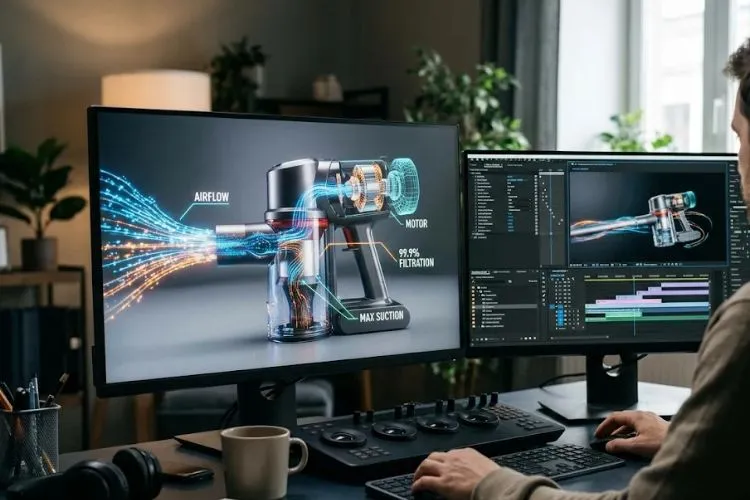
Product demonstrations work when viewers understand what a product does, how it works and why it matters. Motion graphics turn technical information into diagrams, labels and visual sequences. For manufacturers, technology businesses and product-led brands in the UAE, product demonstration animation can make complex functions easier to see without relying on lengthy explanations.Motion graphics are not decoration. With an accurate script, they guide attention and explain processes that may be difficult to film.
What Are Motion Graphics in a Product Demonstration?
Motion graphics are animated design elements such as text, icons, shapes, diagrams, arrows, labels and data visualisations. They are a focused form of animation that communicates information through movement. In a product demonstration, they can identify parts, show how components connect, illustrate a workflow or emphasise a feature at the moment it becomes relevant.
An industrial pump image shows its exterior; animated cutaways can reveal fluid movement and label the inlet, impeller and outlet. This supports, but does not replace, engineering documentation or inspection.
How Motion Graphics Make Product Demonstrations More Effective
1. They make complex features easier to understand
Technical products may contain mechanisms invisible from the outside. Motion graphics can reveal components in stages and show how one action affects another.
2. They direct attention to the most important benefits
Callouts, highlights and camera movement direct attention to relevant features. Show each feature, explain what it changes and connect it to a practical benefit.
3. They explain processes that are difficult to film
Some functions occur inside sealed equipment, at high speed or in unsafe conditions. Animation can show these processes, such as material moving through manufacturing stages.
Choosing the Right Motion Graphics Style
The right approach depends on the product, the audience and the information that must be communicated. Simple 2D graphics are often effective for process maps, feature labels, software workflows and straightforward explanations. A 2d animation explainer can simplify an unfamiliar concept using icons, typography and sequential illustrations.
Three-dimensional animation is more suitable when shape, assembly, internal structure, material behaviour or spatial relationships are central to understanding. Live-action footage can add realism by showing the actual product in use, while motion graphics overlay labels, measurements or explanatory diagrams. A hybrid format is often strongest: film what needs to be authentic and animate what needs to be revealed.
A Practical Framework for Planning a Product Demo
Define one audience and outcome. Procurement may prioritise reliability; operators need setup and safe use; investors may focus on the differentiating mechanism.
- Identify the question. Write down the main uncertainty the viewer needs resolved.
- Choose the proof. Decide which product action, diagram, measurement or real-world scenario demonstrates the answer.
- Build a short narrative. Move from the problem to the product, then to the relevant feature and its practical value.
- Storyboard every scene. Plan labels, transitions, camera views, narration and on-screen text before production.
- Verify technical accuracy. Have a product specialist review dimensions, operating steps, terminology and safety statements.
- Test with real viewers. Ask people from the intended audience what they understood, what remained unclear and what they would do next.
An experienced animation company in Dubai can turn product information into a structured visual story. Include technical review and audience testing in the production brief.
For UAE audiences that include international teams and buyers, plan language and terminology early. English and Arabic versions may require more than translated narration: on-screen labels, units, subtitles and reading direction should be checked in context. Keep a terminology sheet so every version describes the same components consistently.
Accessibility and Quality Matter
Motion should clarify information, not overwhelm viewers. Keep labels readable, use strong contrast and do not rely on colour alone. Caption speech, provide essential information as text and avoid flashing or distracting movement.
This is particularly relevant to digital experiences in the UAE. The UAE Government’s National Digital Accessibility Policy sets out an approach to making digital products and services more accessible to people of determination and older users. It is a government policy context rather than a product-video production specification, but it reinforces the importance of inclusive digital communication. W3C guidance also explains that interaction-triggered animation should allow users to reduce or disable non-essential motion in relevant web experiences.
For safety-critical equipment, technical and safety stakeholders must approve any visuals explaining hazards or operating procedures. A safety animation company UAE may be relevant when the goal is workforce instruction.
How to Measure Whether the Animation Works
Measure more than visual polish. Set goals before publishing; useful indicators include:
- Comprehension: Can viewers correctly explain the product’s main function after watching?
- Engagement: Do viewers reach the section that demonstrates the key feature?
- Sales usefulness: Do sales teams report fewer repeated explanations or better-qualified enquiries?
- Action: Do viewers request a quote, book a consultation, download specifications or take another relevant next step?
- Training outcomes: Can employees correctly describe or perform the demonstrated procedure?
Compare results with a relevant baseline and segment by audience or channel. Views alone do not prove understanding, and conversion changes may also reflect traffic quality, offer or page design.
Common Mistakes to Avoid
Avoid crowded scenes, unnecessary features, unverified technical visuals and generic scripts. One long video may not suit every channel; create focused edits for sales, training and social platforms.
FAQ
Are motion graphics useful for industrial product demonstrations?
Yes. They can show internal components, process stages, operating sequences and safety information that may be difficult to film. Engineering review is essential to keep the visual explanation accurate.
Should I use 2D or 3D motion graphics?
Use 2D for clear diagrams, labels and simple workflows. Choose 3D when viewers need to understand shape, assembly, depth or internal mechanisms. A hybrid of live action and animation may be more credible for products that buyers need to see in real use.
How long should a product demonstration video be?
There is no universal ideal. Keep only the scenes needed to answer the viewer’s question, and create shorter feature edits when useful.
Can one animation support marketing and employee training?
Reuse assets where appropriate, but tailor the message: marketing explains value, while training prioritises actions, warnings and procedures.
Final Takeaway
Motion graphics improve product demonstrations when every movement has a communication purpose. They can reveal hidden mechanisms, organise technical details, direct attention and make complex processes easier to follow. The result depends less on visual effects than on a precise brief, accurate product knowledge, thoughtful pacing, accessibility and testing with the intended audience. Start with the question your viewer needs answered, select the clearest visual proof and measure whether people understand the product better. When the story requires specialist 2D or 3D explanation, Interactivv can help businesses develop product-focused animation that makes technical value easier to see and understand.


